
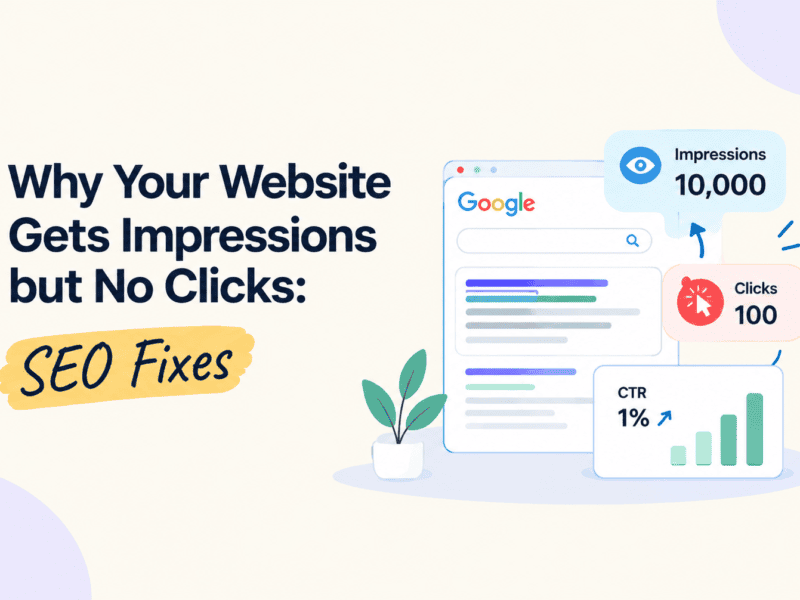
If your website gets impressions but no clicks, it may be time to review your SEO strategy. From title tags and meta descriptions to search intent and keyword targeting, several factors can affect your organic click-through rate (CTR).
You have published quality content, optimized your website, and started appearing in Google search results. Your Google Search Console report shows that your pages are getting impressions, but the number of clicks remains low. What is going wrong?
This is one of the most common challenges website owners face when working on search engine optimization (SEO). While impressions indicate that your website is appearing in search results, clicks show whether users find your listing relevant enough to visit your website.
The good news is that low click-through rates do not always mean your SEO strategy is failing. Your website might need a more compelling title, better meta descriptions, stronger search intent alignment, or improved visibility in search results.
In this guide, we will explain why your website gets impressions but no clicks and explore practical SEO fixes to improve your organic click-through rate (CTR).
Why Your Website Gets Impressions but No Clicks
In Google Search Console, an impression is recorded when a link to your website appears in a user’s search results under Google’s reporting rules. A click is recorded when a user clicks that link to visit your website.
For example, imagine your website receives the following results in a month:
- Total impressions: 10,000
- Total clicks: 100
- Average click-through rate: 1%
- Average position: 12
Your website is appearing in search results, but only a small percentage of users are clicking through to your pages.
A low CTR can indicate that your search listings need improvement. However, the right response depends on your average ranking position, target keywords, search intent, industry, and the type of search results displayed.
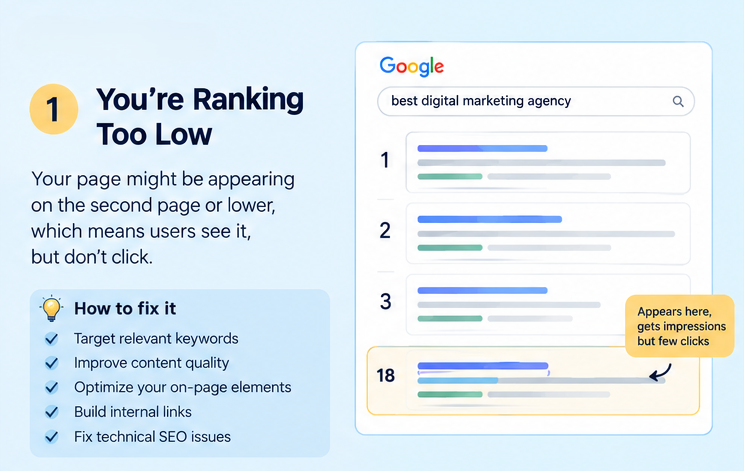
1. Your Website Is Ranking Too Low in Google Search Results
One of the most common reasons for receiving impressions without clicks is a low average ranking position.
Users generally notice results near the top of the search page first. If your website appears on the second page or lower, it may receive impressions without attracting many visitors.
For example, a page ranking in position 18 for a competitive keyword might generate impressions but receive very few clicks.
How to fix it
Focus on improving the page’s organic ranking before making CTR the only priority.
- Target relevant keywords that match your content and audience.
- Improve content quality, depth, and usefulness.
- Optimize headings, title tags, URLs, and internal links.
- Add relevant internal links from other authoritative pages on your website.
- Identify content gaps by comparing your page with competing search results.
- Improve technical SEO issues that prevent Google from crawling or indexing your pages properly.
Pro tip: Open Google Search Console and review the average position of pages with high impressions and low clicks. Prioritize pages ranking just outside the top 10 because they may offer an achievable opportunity for improvement.
2. Your SEO Title Is Not Compelling Enough
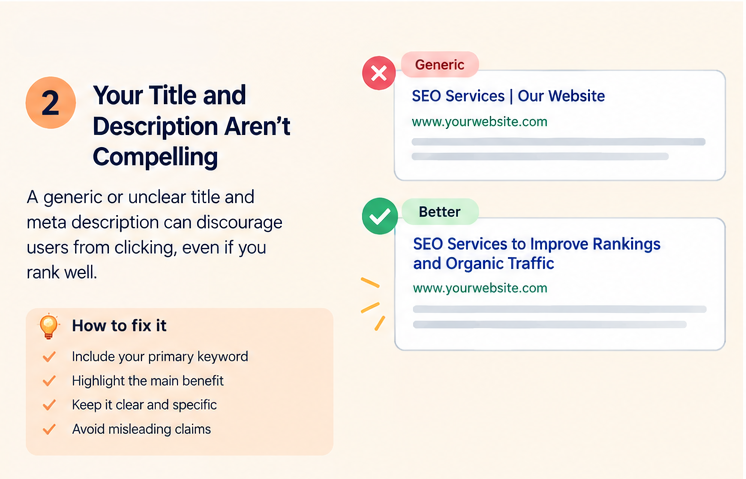
Your SEO title is one of the first things users see in Google search results. Even if your page ranks well, a generic or unclear title may discourage people from clicking.
Consider these two examples.
Generic title: SEO Services | Our Website
More compelling title: SEO Services to Improve Rankings and Organic Traffic
The second title communicates a clearer benefit and gives users a better idea of what they can expect.
However, a compelling title must also accurately represent the content on the page. Avoid exaggerated claims or promises that the page cannot deliver.
How to fix it
Write title tags that are clear, relevant, and focused on the user’s needs.
- Include your primary keyword naturally.
- Communicate the main benefit of visiting the page.
- Make the title specific to the content.
- Use numbers or descriptive phrases when they genuinely add value.
- Keep titles concise enough to communicate the main message clearly.
- Avoid repetitive keywords and unnecessary brand terms.
Google may generate a different title link based on your page headings, prominent text, and other signals. Therefore, make sure your title tag and on-page heading communicate a consistent message.
3. Your Meta Description Does Not Encourage Clicks
A meta description is a short summary that can appear beneath your page title in search results. Although it is not a direct Google ranking factor, a relevant and informative description can help users understand why your page is worth visiting.
If your description is missing, vague, repetitive, or unrelated to the search query, users may choose another result.
How to fix it
Write a unique meta description for every important page.
A strong meta description should:
- Summarize the page’s main purpose.
- Include the primary keyword naturally where relevant.
- Highlight the value users will receive.
- Address the searcher’s question or problem.
- Encourage users to explore the page without making misleading promises.
Example
Instead of: “We provide SEO services for businesses. Contact us for more information.”
Try: “Discover practical SEO strategies to improve search visibility, attract relevant visitors, and grow your organic traffic with a data-driven approach.”
Google may choose a different snippet from your page content depending on the user’s search query. To improve the chances of displaying useful text, ensure your page introduction and important sections are clear and relevant.
4. Your Content Does Not Match Search Intent
Search intent refers to the reason behind a user’s search. Someone searching for information expects a different result from someone ready to purchase a product or hire a service provider.
For example:
- “What is technical SEO?” — Informational intent
- “Best SEO tools for small businesses” — Commercial research intent
- “Hire an SEO agency in Pune” — Transactional or service-oriented intent
If your page targets the wrong intent, users may see your listing but choose a competitor whose content better matches their needs.
How to fix it
Search for your target keyword in Google and examine the types of pages ranking on the first page.
Ask yourself:
- Are the top results blog articles, service pages, product pages, or comparison guides?
- What questions do those pages answer?
- Does your page offer the information users expect?
- Is the content too general for a specific query?
- Does the page provide a clear next step?
Align your content format, depth, and messaging with the search intent while offering original insights that make your page more useful than competing results.
5. Your Target Keywords Are Too Broad or Irrelevant
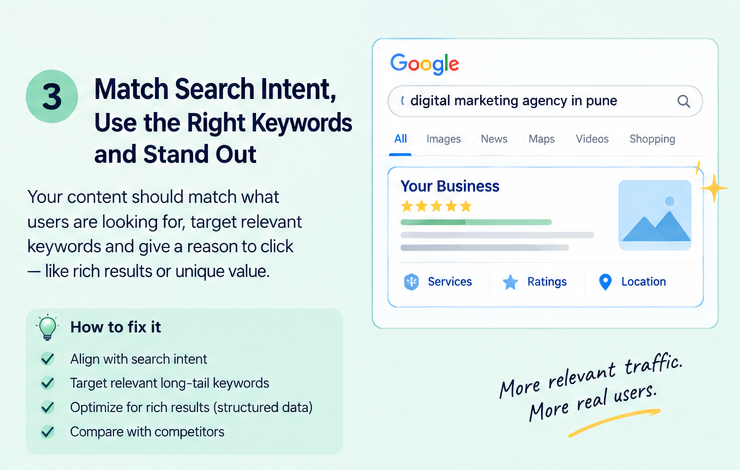
A page can receive many impressions for queries that are only loosely related to its actual content. These impressions may not translate into clicks because the search result does not match what users want.
For example, a small local agency targeting a broad term such as “marketing” may appear for searches that have little relevance to its services.
How to fix it
Use Google Search Console to identify the exact queries generating impressions for your pages.
Look for:
- Queries closely related to your products or services.
- Long-tail keywords with clear intent.
- Search terms where your page already has good visibility.
- Queries that reveal missing information in your content.
- Irrelevant queries that suggest your page’s topic or messaging may be too broad.
Instead of chasing impressions alone, focus on attracting users who are likely to benefit from your content or services.
For local businesses, specific location-based keywords can help connect pages with users searching for services in a particular city or region.
6. Competitors Have More Attractive Search Listings
Even when your page appears on the first page of Google, users may click a competing result because its title, description, or visible features communicate greater value.
Competitors might offer clearer benefits, stronger topical relevance, useful pricing information, or more specific answers to the search query.
Search results can also include maps, featured snippets, videos, shopping listings, and other elements that influence how much attention traditional organic listings receive.
How to fix it
Review the search results for your most important keywords and compare your listing with competing pages.
Evaluate:
- Whether your title clearly explains the page’s value.
- Whether your description addresses the searcher’s needs.
- Whether competitors answer the query more directly.
- Whether the search results include prominent features that affect organic clicks.
- Whether your content offers a meaningful reason to choose your page.
Do not simply copy competitor titles. Identify what users need and communicate how your page meets that need more clearly.
7. Your Page Is Not Eligible for Rich Results or Relevant SERP Features
Some search results display additional information, such as product ratings, recipe details, or other rich-result enhancements. These features can make eligible listings more informative and noticeable.
Structured data helps Google understand certain types of content and may make a page eligible for supported search enhancements. However, adding schema markup does not guarantee that Google will display a rich result.
How to fix it
- Identify whether your page type supports a relevant Google search enhancement.
- Implement the appropriate structured data when it accurately describes the visible page content.
- Validate your markup using Google’s Rich Results Test where applicable.
- Monitor eligible pages and detected enhancements in Search Console.
- Correct errors and review warnings that affect eligibility.
Use structured data to improve search result understanding and eligibility, not as a guaranteed way to increase CTR.
8. Your Website Appears for the Wrong Page or Has Cannibalization Issues
Sometimes multiple pages on the same website target similar keywords. This can make it harder to establish which page best serves a particular search intent.
For example, a website might have several blog posts targeting nearly identical SEO topics, while none provides a clear, comprehensive answer.
This situation may contribute to fluctuating rankings, confusing internal linking, or the wrong page appearing for a query. However, multiple pages ranking for related terms are not automatically a problem.
How to fix it
Use Google Search Console to compare queries and the pages receiving impressions for those queries.
Then:
- Identify pages with overlapping topics and search intent.
- Give each page a clear purpose and keyword focus.
- Improve internal links using descriptive, relevant anchor text.
- Consolidate genuinely overlapping content when appropriate.
- Redirect outdated URLs only when there is a suitable replacement.
- Keep separate pages when they serve distinct user needs.
The goal is to make your website’s content structure clearer for users and search engines.
9. Your Search Snippet Does Not Build Trust
Users are more likely to click when a search result appears relevant, credible, and useful. Unclear messaging, outdated information, or a mismatch between the title and the page content may reduce confidence.
For service businesses, a listing that fails to communicate expertise or the specific service offered can struggle to attract qualified clicks.
How to fix it
Build credibility through the content and overall website experience.
- Keep important information accurate and updated.
- Show relevant experience and expertise where appropriate.
- Include original examples, research, or case studies when available.
- Use clear headings and informative introductions.
- Ensure the page fulfills the promise made by its title.
- Maintain a professional, consistent brand presence.
Trust is not created by adding promotional language alone. The content must provide real value and support its claims.
10. You Are Ignoring Mobile Search Performance
Many users search on mobile devices. A title that communicates its main benefit too late, a vague description, or content that does not answer the query quickly can make your result less appealing.
Mobile search results may also display differently from desktop results, and the visible portion of a title or snippet can vary.
How to fix it
- Put the most important information near the beginning of your title.
- Make your page introduction direct and easy to understand.
- Ensure your website is responsive and easy to navigate.
- Improve page loading performance and address usability issues.
- Review mobile and desktop performance separately where Search Console data allows.
Remember that page speed and mobile usability can improve the overall user experience, but they do not automatically solve a low search CTR. Diagnose the actual issue before making changes.
How to Find Pages With High Impressions but Low Clicks in Google Search Console
Google Search Console is one of the most useful tools for diagnosing this problem because it shows how your website performs in Google Search.
Follow these steps to identify pages that may need improvement.
Step 1: Open Google Search Console
Sign in to Google Search Console and select the correct website property.
Step 2: Open the Performance Report
Navigate to Performance → Search results.
This report includes metrics such as total clicks, total impressions, average CTR, and average position.
Step 3: Review Your Date Range
Select a suitable period, such as the last three months. Compare it with the previous period when useful to identify changes in performance.
Step 4: Analyze Pages With High Impressions
Open the Pages tab and sort the results by impressions.
Look for pages that receive substantial visibility but generate relatively few clicks. Do not judge a page by impressions alone; consider its average position, topic, and query mix.
Step 5: Check the Queries Tab
Select an individual page and inspect its search queries.
Determine whether the page is appearing for the intended keywords and whether the title and content match those searches.
Step 6: Prioritize the Right Fix
Use your findings to decide whether the page needs:
- A more relevant SEO title.
- A clearer meta description.
- Better alignment with search intent.
- Stronger content and internal links.
- Improved rankings for relevant queries.
- A review of competing search features or overlapping pages.
Step 7: Measure the Results
Record the page’s original clicks, impressions, CTR, and average position before making changes.
After updating the page, allow time for Google to recrawl it and collect enough new data. Compare performance over a suitable period while accounting for changes in seasonality, rankings, and search demand.
How to Fix a Website That Gets Impressions but No Clicks
Use this checklist when auditing pages with high impressions and low clicks.
- Review average ranking position and target queries.
- Rewrite unclear or generic SEO titles.
- Create unique, relevant meta descriptions.
- Match content with the user’s search intent.
- Target relevant long-tail keywords.
- Compare your search listing with competitors.
- Improve content quality and internal linking.
- Check for overlapping pages and keyword cannibalization.
- Validate relevant structured data.
- Review mobile search performance.
- Track clicks, impressions, CTR, and average position after changes.
Frequently Asked Questions
1. Why is my website getting impressions but no clicks?
Your website may be ranking too low, targeting broad or irrelevant keywords, displaying an unappealing title, or failing to match the user’s search intent. Review the Performance report in Google Search Console to identify which pages and queries need attention.
2. What is a good organic click-through rate for SEO?
There is no single CTR benchmark that applies to every website. CTR varies by ranking position, query type, industry, device, brand recognition, and search result layout. Compare similar queries and pages on your own website instead of relying on a universal percentage.
3. Does a low CTR affect Google rankings?
Google uses many signals to determine search rankings, and CTR should not be treated as a direct ranking factor that can be manipulated to improve positions. However, analyzing CTR can help you identify search listings that may be unclear or poorly aligned with user intent.
4. How can I improve my website’s CTR without changing rankings?
You can test clearer title tags, more relevant meta descriptions, better messaging, and stronger alignment with search intent. Google may rewrite titles and snippets, so monitor what actually appears in search results and evaluate changes using Search Console data.
5. How long does it take to see results after making SEO changes?
There is no fixed timeline. Google needs to recrawl and process updated content, and performance can fluctuate due to competition, seasonality, and search demand. Monitor trends over several weeks or longer, depending on the page’s traffic and the volume of available data.
6. Which tool can help identify pages with low CTR?
Google Search Console is the primary tool for reviewing organic clicks, impressions, CTR, average position, and search queries. Google Analytics 4 can complement it by showing what users do after reaching your website.
Conclusion
Getting impressions without clicks does not necessarily mean your SEO strategy is failing. It means you need to investigate how your website appears in search results and whether it meets the needs of the people searching for your content.
Start with Google Search Console. Identify pages with high impressions, review their average ranking positions, analyze the queries they receive, and improve the elements that genuinely need attention.
From better title tags and meta descriptions to stronger search intent alignment and more useful content, small, data-driven improvements can help your website attract more relevant organic visitors over time.
Need help improving your website’s search visibility and organic traffic?
The Vanilla Theory helps businesses strengthen their digital presence through SEO, content strategy, website development, and digital marketing solutions. Visit The Vanilla Theory to explore how a data-driven SEO strategy can support your business growth.


