
A business website can look professional, load quickly, and have excellent content—but if search engines cannot properly crawl, understand, and index it, ranking on Google becomes much harder.
This is where Technical SEO comes in.
Technical SEO focuses on improving the technical foundation of your website so that search engines can efficiently crawl your pages, understand your content, index important URLs, and provide a better experience for visitors.
For businesses competing online in 2026, technical SEO is no longer something that should be treated as an optional website optimization. It is an important part of building a search-friendly, fast, secure, and scalable website.
In this guide, The Vanilla Theory explains what technical SEO is, why it matters for business websites, and the most important technical SEO factors you should check in 2026.
What Is Technical SEO?
Technical SEO is the process of optimizing the technical structure and performance of a website to make it easier for search engines to crawl, render, understand, and index.
Unlike content SEO, which focuses primarily on keywords and content quality, technical SEO focuses on the infrastructure behind your website.
It includes areas such as:
- Website speed and performance
- Mobile-friendliness
- Crawlability
- Indexability
- XML sitemaps
- Robots.txt
- Website architecture
- URL structure
- Canonical URLs
- HTTPS and website security
- Structured data
- Core Web Vitals
- Redirects and broken links
- JavaScript rendering
- Duplicate content
- International SEO implementation
A technically optimized website gives search engines a cleaner path to discover and understand your important pages.
Why Technical SEO Matters for Business Websites
Imagine investing heavily in content marketing, Google Ads, social media, and link building—but your most important service pages are accidentally blocked from search engines.
Your marketing efforts may generate traffic, but your organic visibility can still suffer.
Technical SEO helps prevent these problems.
1. Helps Search Engines Crawl Your Website
Search engines use crawlers to discover and revisit pages on your website.
A clear website structure, useful internal links, XML sitemap, and properly configured robots.txt file can make crawling more efficient.
2. Improves Indexability
A page must generally be indexed before it can appear in organic search results.
Technical SEO helps ensure that your valuable pages are not accidentally excluded through:
noindexdirectives- Incorrect canonical tags
- Robots.txt restrictions
- Server errors
- Redirect problems
- Duplicate URL versions
3. Improves User Experience
Technical SEO is not only about Google.
Website speed, mobile usability, navigation, security, and stability directly affect how users interact with your website.
A slow or difficult-to-use website can result in visitors leaving before they contact your business.
4. Supports Better Organic Performance
Technical SEO does not guarantee rankings by itself.
However, a technically healthy website creates a stronger foundation for content, authority, and other SEO efforts to perform effectively.
Technical SEO Checklist for Business Websites in 2026
Let’s look at the most important technical SEO elements businesses should review.
1. Make Sure Your Website Uses HTTPS
Website security is fundamental.
Your business website should use HTTPS rather than HTTP.
HTTPS encrypts data transferred between the visitor and your website and provides a more secure browsing experience.
Check that:
- Your SSL certificate is valid.
- HTTP URLs redirect to HTTPS.
- Internal links use HTTPS.
- Images and scripts are loaded through HTTPS.
- There are no mixed-content warnings.
For a business website collecting enquiries, contact information, or other user data, HTTPS should be considered essential.
2. Optimize Website Speed
Website performance can significantly affect user experience.
Visitors expect websites to load quickly, particularly on mobile devices and slower connections.
Common causes of slow websites include:
- Large images
- Unoptimized videos
- Excessive JavaScript
- Too many plugins
- Poor hosting
- Render-blocking resources
- Unnecessary third-party scripts
- Unoptimized CSS
- Lack of caching
How to Improve Website Speed
You can improve performance by:
- Compressing images
- Using modern image formats such as WebP
- Implementing browser caching
- Using a CDN where appropriate
- Minifying CSS and JavaScript
- Removing unnecessary plugins
- Deferring non-critical JavaScript
- Optimizing fonts
- Reducing third-party scripts
Tools such as Google PageSpeed Insights and Lighthouse can help identify performance issues.
3. Understand Core Web Vitals
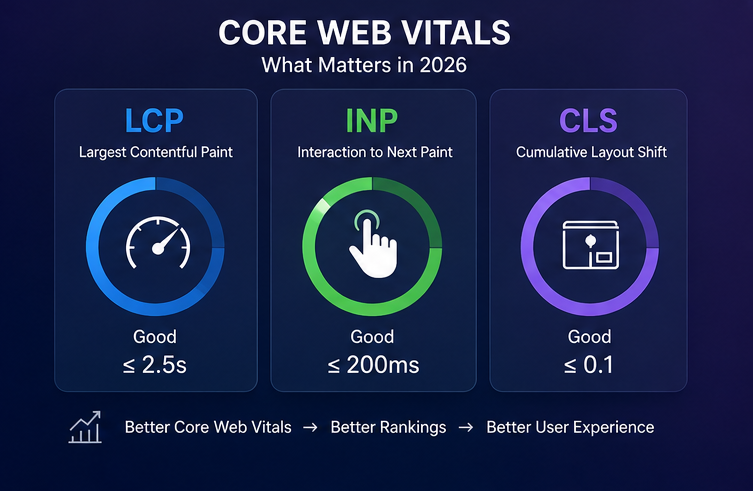
Core Web Vitals are a group of performance metrics designed to measure important aspects of page experience.
The key metrics include:
Largest Contentful Paint (LCP)
LCP measures how quickly the main content of a page becomes visible.
A good LCP target is generally 2.5 seconds or less.
Interaction to Next Paint (INP)
INP measures how responsive a page is when users interact with it.
A good INP target is generally 200 milliseconds or less.
Cumulative Layout Shift (CLS)
CLS measures unexpected movement of content while a page loads.
A good CLS score is generally 0.1 or less.
For business websites, optimizing these metrics can help create a smoother experience for potential customers.
4. Make Your Website Mobile-Friendly
Most businesses cannot afford to ignore mobile users.
Your website should work properly across smartphones, tablets, laptops, and desktop screens.
Check:
- Responsive layouts
- Readable text
- Proper button sizes
- Easy navigation
- Mobile-friendly forms
- Proper image scaling
- No horizontal scrolling
- Fast mobile loading
Don’t simply test whether your website “looks okay” on a phone.
Test important user journeys such as:
Homepage → Service → Contact → Form Submission
If a visitor cannot easily complete that journey on mobile, your website may be losing potential leads.
5. Create and Optimize an XML Sitemap
An XML sitemap provides search engines with information about important URLs on your website.
For a business website, your sitemap should generally contain the canonical URLs of pages you want search engines to discover and index.
Depending on your CMS and SEO setup, your sitemap may automatically be generated.
For example, a WordPress website using an SEO plugin can typically generate an XML sitemap automatically.
Regularly check that your sitemap:
- Loads correctly
- Contains important pages
- Does not contain unnecessary URLs
- Does not include pages marked
noindex - Uses the correct HTTPS URLs
- Does not contain broken URLs
You can submit your sitemap through Google Search Console.
6. Check Your Robots.txt File
The robots.txt file tells compliant search-engine crawlers which areas of a website they may or may not crawl.
A common mistake is blocking important pages accidentally.
For example, an overly restrictive robots.txt configuration could prevent search engines from accessing valuable content.
Your robots.txt should be reviewed carefully before making changes.
Remember:
Robots.txt controls crawling—not necessarily indexing.
If you want to prevent a page from appearing in search results, using an appropriate noindex directive is often more suitable than simply blocking the crawler from accessing the page.
7. Improve Website Architecture
A good website structure helps both visitors and search engines understand the relationship between pages.
A business website should have a logical hierarchy.
For example:
Home
→ About Us
→ Services
→ Service A
→ Service B
→ Service C
→ Industries
→ Case Studies
→ Blog
→ Contact
Important commercial pages should not be buried several clicks deep.
Use descriptive navigation and internal links to connect related pages.
8. Optimize URL Structure
Good URLs are simple, descriptive, and easy to understand.
Poor URL
example.com/page?id=12345
Better URL
example.com/website-development/
Avoid unnecessary parameters, complicated structures, and excessive URL variations.
For business websites:
- Keep URLs short where practical.
- Use descriptive words.
- Use hyphens between words.
- Avoid unnecessary dates.
- Avoid keyword stuffing.
- Maintain consistent URL structures.
9. Use Canonical URLs Correctly
Duplicate or very similar URLs can create confusion about which version should be considered the primary page.
Canonical tags help communicate the preferred URL.
For example, several URL variations might potentially represent the same page:
example.com/service
example.com/service/
www.example.com/service/
example.com/service?source=google
Your technical SEO setup should clearly establish the preferred canonical version.
Canonicalization is particularly important for larger websites, e-commerce websites, and websites that generate URL parameters.
10. Find and Fix Broken Links
Broken links can create poor user experiences and unnecessary crawling issues.
Regularly check for:
- 404 pages
- Broken internal links
- Broken external links
- Incorrect redirects
- Deleted pages
- Old URLs
If a page has permanently moved, use a relevant 301 redirect rather than simply sending users to an unrelated page.
Avoid redirect chains such as:
Page A → Page B → Page C → Page D
Whenever possible, redirect the old URL directly to the final destination.
11. Fix Duplicate Content Issues
Duplicate content occurs when substantially similar or identical content appears across multiple URLs.
Common causes include:
- URL parameters
- Duplicate service pages
- HTTP and HTTPS versions
- www and non-www versions
- Printer-friendly URLs
- Duplicate category pages
- CMS-generated URLs
Technical SEO should identify these issues and establish the preferred version of each page.
However, not every duplicate or similar page is automatically a serious SEO problem. The goal is to make your site’s preferred URLs and page relationships clear.
12. Optimize Internal Linking
Internal links connect one page on your website to another.
They help users discover additional content and help search engines understand your website structure.
For example, a blog about SEO could naturally link to your:
- SEO services page
- Local SEO page
- Technical SEO page
- Contact page
Use descriptive anchor text rather than generic phrases such as “click here” whenever appropriate.
A strong internal linking strategy can also help distribute authority throughout your website.
13. Implement Structured Data
Structured data provides search engines with additional information about the content of a page.
Depending on your website, relevant structured data may include:
- Organization
- Local Business
- Article
- Breadcrumb
- Product
- Service
- FAQ, where eligible and appropriate
Structured data does not guarantee rich results, but correctly implemented markup can help search engines understand your content more clearly and may make eligible pages suitable for enhanced search appearances.
Always validate structured data after implementation.
14. Optimize Breadcrumb Navigation
Breadcrumbs show users where they are within your website hierarchy.
For example:
Home → Services → SEO Services → Technical SEO
Breadcrumbs can improve navigation and provide search engines with additional information about your site’s structure.
They are particularly useful for websites with multiple service categories, products, or content sections.
15. Manage Redirects Properly
Website redesigns, URL changes, migrations, and deleted pages can create redirect requirements.
Common redirect issues include:
- Redirect chains
- Redirect loops
- Incorrect 302 redirects
- Redirecting everything to the homepage
- Redirecting to irrelevant pages
- Large numbers of unnecessary redirects
Before launching a new website, prepare a URL mapping document that identifies old URLs and their corresponding new URLs.
This can help protect existing organic visibility during a migration.
16. Handle 404 Pages Correctly
A 404 error means that the requested page cannot be found.
Some 404 errors are normal—for example, when someone manually enters an incorrect URL.
The problem occurs when valuable internal links or high-traffic URLs unexpectedly lead to 404 pages.
Create a helpful 404 page that includes:
- Clear messaging
- Website navigation
- Search functionality, if useful
- Links to important pages
- A path back to the homepage
Monitor your website for important 404 errors and fix them where necessary.
17. Optimize Images for SEO and Performance
Images can significantly affect page performance.
Before uploading an image:
- Resize it to an appropriate dimension.
- Compress it.
- Use WebP or another suitable modern format.
- Use descriptive file names.
- Add meaningful alt text when appropriate.
- Avoid uploading unnecessarily large files.
For example:
IMG_2026_website.jpg
is less descriptive than:
website-development-company-pune.jpg
However, don’t force keywords into every image filename or alt attribute. Alt text should primarily describe the image and its purpose.
18. Optimize JavaScript Rendering
Modern websites often rely heavily on JavaScript. JavaScript can create technical SEO challenges when important content or links are difficult for search engines to discover or render.
Check whether:
- Important content is available in the rendered page.
- Navigation links are crawlable.
- Important text is not unnecessarily hidden behind interactions.
- JavaScript errors are not preventing content from loading.
- Critical content is not dependent on unreliable client-side rendering.
This becomes particularly important for React, Next.js, and other JavaScript-heavy websites.
19. Manage Crawl Budget Efficiently
Crawl budget becomes more important as websites become larger. For a small business website with a few dozen pages, crawl budget is usually not a major concern. However, large websites can generate thousands or millions of URLs through:
- Filters
- Search pages
- Parameters
- Tags
- Archives
- Faceted navigation
Technical SEO can help control unnecessary URL generation and make crawling more efficient.
20. Use Google Search Console
Google Search Console is one of the most useful tools for monitoring technical SEO.
Business owners and marketing teams can use it to identify:
- Indexing issues
- Sitemap problems
- Search performance
- Search queries
- Page indexing status
- Core Web Vitals issues
- Mobile usability issues
- Manual actions
- Security problems
Check Search Console regularly rather than only opening it when something goes wrong.
21. Conduct Regular Technical SEO Audits
Technical SEO is not a one-time activity. Websites change continuously. Developers publish new pages, redesign layouts, install plugins, modify URLs, add scripts, and migrate content.
Each change can potentially introduce SEO issues.
A technical SEO audit should check:
Technical Foundation
- HTTPS
- Site accessibility
- Mobile usability
- Page speed
- Core Web Vitals
Crawlability
- Robots.txt
- XML sitemap
- Internal links
- Crawl errors
Indexability
- Noindex tags
- Canonical tags
- Duplicate pages
- Index status
Website Architecture
- Navigation
- URL structure
- Breadcrumbs
- Internal linking
Technical Content
- Title tags
- Meta descriptions
- Heading structure
- Image optimization
- Structured data
Performance
- LCP
- INP
- CLS
- JavaScript
- CSS
- Server response time
Technical SEO Checklist for 2026
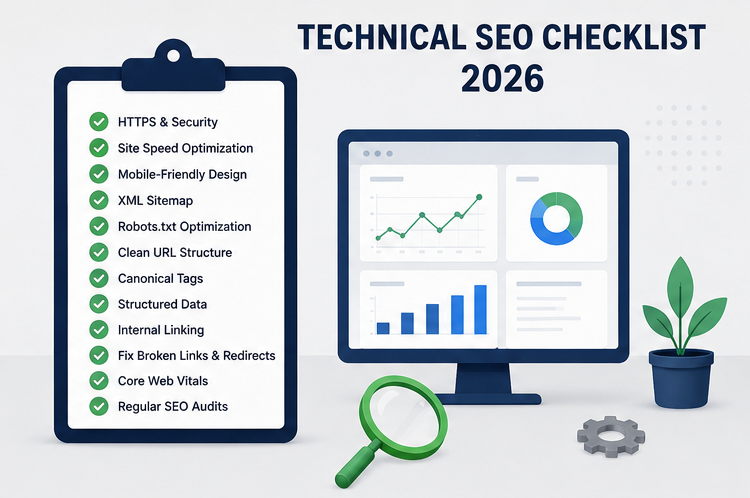
Use this quick checklist when auditing your business website:
| Technical SEO Factor | Check |
|---|---|
| HTTPS | ✓ |
| XML Sitemap | ✓ |
| Robots.txt | ✓ |
| Mobile Responsiveness | ✓ |
| Core Web Vitals | ✓ |
| Website Speed | ✓ |
| Clean URL Structure | ✓ |
| Canonical Tags | ✓ |
| 301 Redirects | ✓ |
| Broken Links | ✓ |
| 404 Errors | ✓ |
| Internal Linking | ✓ |
| Structured Data | ✓ |
| Breadcrumbs | ✓ |
| Image Optimization | ✓ |
| JavaScript Rendering | ✓ |
| Duplicate Content | ✓ |
| Google Search Console | ✓ |
| Regular SEO Audits | ✓ |
Common Technical SEO Mistakes Businesses Make
Many business websites lose organic opportunities because of relatively simple technical problems.
Mistake 1: Launching a Redesign Without Redirects
Changing URLs without mapping old URLs to new ones can result in broken links and lost organic traffic.
Mistake 2: Blocking Important Pages
Incorrect robots.txt rules or noindex tags can prevent important pages from being properly indexed.
Mistake 3: Ignoring Mobile Performance
A website that works well on desktop but performs poorly on mobile can create a frustrating experience for visitors.
Mistake 4: Installing Too Many Plugins
WordPress plugins can add functionality, but unnecessary or poorly optimized plugins may increase page weight and create conflicts.
Mistake 5: Ignoring Search Console
Technical issues can remain unnoticed if nobody monitors indexing and search performance.
Mistake 6: Focusing Only on Keywords
SEO is more than adding keywords to pages.
A website needs strong technical foundations, useful content, relevant authority, and a good user experience.
Technical SEO for WordPress Business Websites
WordPress is one of the most widely used website platforms, but it still needs proper technical optimization.
For WordPress business websites, pay particular attention to:
- Theme performance
- Plugin quality
- Image optimization
- Caching
- CSS and JavaScript optimization
- Database performance
- XML sitemap configuration
- Canonical URLs
- Redirect management
- SEO plugin configuration
- Hosting performance
- Security
- Regular updates
Avoid installing multiple plugins that perform the same optimization tasks.
For example, running several caching or image optimization systems simultaneously can sometimes create conflicts rather than improving performance.
Technical SEO vs On-Page SEO
Although they work together, technical SEO and on-page SEO focus on different areas.
| Technical SEO | On-Page SEO |
|---|---|
| Website speed | Content quality |
| Crawlability | Keyword targeting |
| Indexability | Search intent |
| XML sitemap | Headings |
| Robots.txt | Meta titles |
| Canonicals | Meta descriptions |
| Structured data | Content optimization |
| Mobile performance | Internal content |
| Redirects | Image alt text |
The strongest SEO strategies combine both.
How Technical SEO Supports Business Growth
Technical SEO isn’t just a developer task.
For businesses, it supports the entire digital marketing ecosystem.
A technically healthy website can:
Improve discoverability → Improve user experience → Support organic visibility → Increase qualified traffic → Generate more enquiries
For example, a service-based business might publish an article targeting a valuable search query.
If the website has:
- Poor loading performance
- Broken internal links
- Incorrect canonical tags
- Indexing problems
- Poor mobile usability
the content may struggle to deliver its full potential.
Technical SEO ensures that your content and marketing investments have a stronger foundation.
How Often Should You Perform a Technical SEO Audit?
The ideal frequency depends on the size and complexity of your website.
Small Business Website
A basic technical review every 3–6 months can be useful, along with regular monitoring of Search Console.
Medium-Sized Website
Consider performing technical audits quarterly and after significant website changes.
Large or Frequently Updated Website
More frequent monitoring may be appropriate, particularly after:
- Website migrations
- Major redesigns
- CMS updates
- URL changes
- Hosting changes
- Large content launches
You should also investigate technical issues whenever Search Console or analytics data shows unexpected changes.
Final Thoughts
Technical SEO is the foundation that allows search engines and users to access your website efficiently.
From website speed and mobile usability to indexing, redirects, structured data, internal linking, and Core Web Vitals, every technical element contributes to the overall health of your website.
In 2026, businesses should not treat technical SEO as a one-time checklist. It should be part of an ongoing website maintenance and SEO strategy.
If your website is attracting visitors but not generating enough organic traffic or leads, the problem may not simply be your keywords or content. There could be technical issues limiting your website’s visibility and performance.
The Vanilla Theory helps businesses build stronger digital foundations through SEO, website development, performance optimization, and digital marketing strategies.
Whether you are launching a new business website, redesigning an existing website, or trying to improve your Google visibility, a technical SEO audit can help identify the issues standing between your website and better organic performance.
Ready to improve your website’s technical SEO?
Connect with The Vanilla Theory to build a faster, search-friendly, and conversion-focused business website.


